
Pay Your Invoice Online — Quick & Easy
Our secure Bill Pay website allows you to view invoices, review statements, and make payments online—whenever it’s convenient for you.
Please note: this is a separate site from Plan Sponsor Link, which you use to access your documents and other resources at TRA.
A simple guide to setting up your online Bill Pay account
- ▾
Step 1: Visit the Bill Pay Website
Log In – Visit billpay.tra401k.com/ and sign in to your account
Under the Sign In box, click “Create a new contact for your account.”
- ▾
Step 2: Verify Your Account
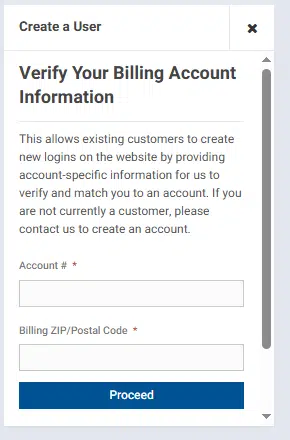
To ensure security, you’ll be asked to verify your billing information.
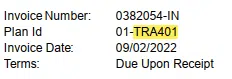
Account #: Your six character Plan ID, found on your invoice under the Invoice Number.
 Billing ZIP Code
- Security Code shown in the black box on the screen
– Click ProceedOn the next screen, confirm that the displayed account information is correct.- If the information is correct, proceed by adding your contact information.
- If not, click Go Back and re‑enter your information
- ▾
Step 3: Create Your Login
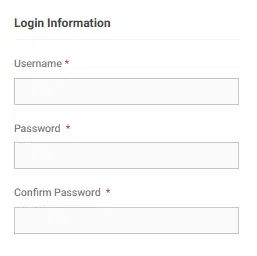
 Complete the Contact Information and Login Information sections.
Required fields are marked with a red asterisk (*).Username Guidelines
- At least 6 characters
- Letters and numbers only
- Allowed symbols: – _ . @
Password Guidelines
- 8–20 characters
- At least one uppercase letter
- At least one lowercase letter
- At least one number
- Cannot include: -, <, >, |, ~, !, ;
Email Address
- Payment receipts will be sent to the email address you provide
Click Create Login to finish.
- ▾
AutoPay Enrollment
After you set up your Bill Pay account you can then enroll in a AutoPay
Click here for a brief tutorial.
 Billing ZIP Code
 Complete the Contact Information and Login Information sections.
Access Your Account Anytime
Once your login is created, you’ll be signed in automatically.
From the Bill Pay website, you can:
- View invoices and statements
- Review payment history
- Pay invoices using debit/credit card or ACH with reoccurring or one time payments.
Helpful Tip: Bookmark the website so you can return quickly anytime.
Need Assistance?
Please contact your client relationship manager or accounting for assistance.
Phone: 888‑872‑3264 ext. 2006
Email: accounting@tra401k.com
To ensure you receive our important emails and updates, please add tra401k.com to your email whitelist or approved senders list. This simple step will help prevent our emails from being filtered as spam and ensure you receive future communications pertinent to your plan. Thank you for choosing to stay connected with The Retirement Advantage, Inc. (TRA)®.